How to become a .NET developer: what you need to learn
You want to become a .NET developer, but the learning list feels scattered:
C#, ASP.NET Core, SQL, EF Core, APIs, authentication, Azure, Docker, Git, testing
The mistake is trying to learn all of it at the same depth on day one. A .NET developer is not someone who memorizes every framework. A .NET developer can build, debug, secure, test, and deploy applications using the .NET ecosystem.
By the end of this roadmap, you will know what to learn first, what to build at each stage, and what skills separate a beginner from a job-ready junior developer.
We will use one running goal: build a course management system where students can register, browse courses, enroll, pay a fee, and where admins can manage course data.
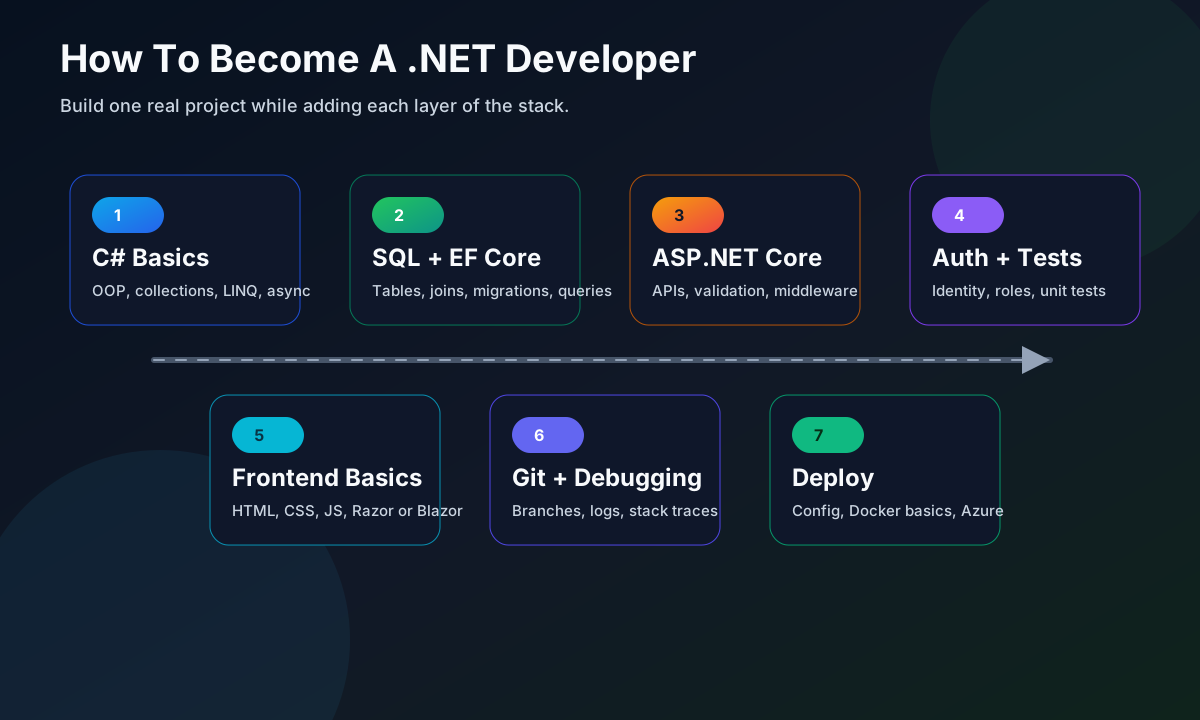
Stage 1: Learn C# properly
C# is the foundation. Do not rush into ASP.NET Core before you can read and write basic C# comfortably.
Start with:
- variables, operators, conditions, loops
- methods and parameters
- arrays, lists, dictionaries, and sets
- classes, objects, constructors, properties
- interfaces and inheritance
- exceptions
- generics
- nullable reference types
- LINQ basics
- async and await
For the course system, your first project can be a console app:
public class Course
{
    public int Id { get; set; }
    public string Title { get; set; } = "";
    public decimal Fee { get; set; }
}

var courses = new List<Course>
{
    new Course { Id = 1, Title = "C# Basics", Fee = 4999 },
    new Course { Id = 2, Title = "ASP.NET Core", Fee = 7999 }
};

var affordableCourses = courses
    .Where(course => course.Fee < 6000)
    .ToList();
This tiny example already uses classes, collections, object initializers, lambdas, and LINQ.
Your goal at this stage is not fancy architecture. Your goal is to make C# feel normal.
Stage 2: Understand the .NET platform
.NET is the runtime, libraries, SDK, CLI, and ecosystem around languages like C#.
Learn these basics:
- what the .NET SDK is
- how to use
dotnet new,dotnet build,dotnet run, anddotnet test - project files such as
.csproj - NuGet packages
- appsettings files
- dependency injection
- logging
- configuration
Create projects from the terminal:
dotnet new console -n CourseConsole
dotnet build
dotnet run
Then create a test project:
dotnet new xunit -n CourseConsole.Tests
dotnet test
This gives you confidence with the tooling. A developer who can only click buttons in an IDE often struggles when a build fails in CI or deployment.
Stage 3: Learn SQL and relational database basics
Most business .NET applications store data in a database. You do not need to become a database administrator, but you must understand relational data.
Learn:
- tables, rows, columns, primary keys, foreign keys
SELECT,WHERE,ORDER BY- joins
- indexes
- transactions
- basic normalization
- constraints
For the course system, the first database design might include:
Students(Id, Name, Email)
Courses(Id, Title, Fee)
Enrollments(Id, StudentId, CourseId, EnrolledAt)
Practice writing queries before using an ORM:
SELECT s.Name, c.Title, e.EnrolledAt
FROM Enrollments e
JOIN Students s ON s.Id = e.StudentId
JOIN Courses c ON c.Id = e.CourseId
WHERE c.Id = 1;
Entity Framework Core becomes easier when you already understand what SQL it is trying to generate.
Stage 4: Learn ASP.NET Core
ASP.NET Core is the main framework for building web apps and APIs in modern .NET.
Start with Web API fundamentals:
- HTTP methods: GET, POST, PUT, PATCH, DELETE
- status codes
- routing
- controllers or minimal APIs
- model binding
- validation
- middleware
- dependency injection
- error handling
- OpenAPI or Swagger
A simple API endpoint might look like this:
app.MapGet("/courses", () =>
{
    return Results.Ok(new[]
    {
        new { Id = 1, Title = "C# Basics" },
        new { Id = 2, Title = "ASP.NET Core" }
    });
});
Then move from fake data to a service class, and from a service class to a database.
Learn Razor Pages or MVC if you want server-rendered web apps. Learn Blazor if your target companies use it. For many junior backend roles, Web API plus a JavaScript frontend is a strong path.
Stage 5: Learn Entity Framework Core
Entity Framework Core is the common object-relational mapper for .NET. It lets you work with database rows through C# objects while still mapping to a real relational database.
Learn:
DbContext- entity classes
- relationships
- migrations
- querying with LINQ
- tracking vs no tracking
- eager loading with
Include - transactions
- performance basics
Example model:
public class AppDbContext : DbContext
{
    public DbSet<Course> Courses => Set<Course>();
    public DbSet<Student> Students => Set<Student>();
    public DbSet<Enrollment> Enrollments => Set<Enrollment>();
}
Example query:
var enrollments = await db.Enrollments
    .Include(enrollment => enrollment.Course)
    .Where(enrollment => enrollment.StudentId == studentId)
    .ToListAsync();
Do not treat EF Core as magic. Check generated queries when performance matters, avoid loading huge graphs accidentally, and understand indexes.
Stage 6: Learn authentication and authorization
Real applications need identity. A course platform needs students, admins, and protected actions.
Learn the difference:
- Authentication asks: who are you?
- Authorization asks: what are you allowed to do?
Topics to study:
- cookies and sessions
- JWT bearer tokens
- ASP.NET Core Identity
- roles and policies
- password hashing basics
- refresh tokens at a high level
- protecting endpoints with
[Authorize]
Example:
[Authorize(Roles = "Admin")]
[HttpPost("/courses")]
public IActionResult CreateCourse(CreateCourseRequest request)
{
    // Only admins should create courses.
    return Ok();
}
Security is not a place for guesswork. Use framework-supported authentication libraries and understand their defaults before customizing them.
Stage 7: Learn testing
Testing is one of the fastest ways to look job-ready because it shows that you can protect behavior, not just write code once.
Learn:
- unit tests
- integration tests
- test doubles and mocks
- arrange, act, assert
- testing validation and edge cases
- testing APIs
Example unit test:
[Fact]
public void ApplyDiscount_ReducesFee()
{
    var course = new Course { Title = "C# Basics", Fee = 5000 };

    course.ApplyDiscount(1000);

    Assert.Equal(4000, course.Fee);
}
For ASP.NET Core, learn how to test endpoints with an in-memory test server. You do not need perfect test coverage as a beginner, but you should know how to test important business rules and API behavior.
Stage 8: Learn frontend basics
Even backend-focused .NET developers need enough frontend knowledge to understand the full request-response flow.
Learn:
- HTML forms
- CSS layout basics
- JavaScript fundamentals
- fetch requests
- JSON
- browser developer tools
- accessibility basics
If your goal is full-stack .NET, choose one frontend path:
- Razor Pages or MVC for server-rendered apps
- Blazor for C#-heavy interactive UI
- React, Angular, or Vue with ASP.NET Core Web API
Do not learn three frontend frameworks at once. Pick one and connect it to your API.
Stage 9: Learn Git, debugging, and everyday engineering
These skills matter in real teams:
- Git branches, commits, pull requests, merge conflicts
- debugging with breakpoints
- reading stack traces
- logging useful context
- using environment variables
- reading documentation
- writing clear README files
- understanding basic CI checks
For your course management project, your README should explain:
1. What the app does.
2. How to run it locally.
3. What database it needs.
4. How to run tests.
5. Which features are complete.
This makes your project easier to review and easier to discuss in interviews.
Stage 10: Learn deployment basics
A project that only runs on your machine is incomplete.
Learn:
- publishing a .NET app
- environment-specific configuration
- connection strings
- secrets management
- Docker basics
- Azure App Service or another hosting platform
- database migrations in deployment
- health checks and logs
You do not need to master cloud architecture immediately. First, deploy one small ASP.NET Core API and connect it to a managed database.
What to build for your portfolio
Build fewer projects, but make them complete.
| Project | Skills it proves | Minimum features |
|---|---|---|
| Course management API | C#, ASP.NET Core, EF Core, SQL | CRUD, validation, filtering, migrations |
| Authentication-based dashboard | Identity, authorization, UI integration | Login, roles, protected admin pages |
| Payment or booking workflow mock | Business logic and testing | State changes, edge cases, tests |
A strong junior portfolio project should have validation, error handling, database persistence, tests, and deployment notes. A simple project with these details is better than a large unfinished clone.
A practical 12-week learning plan
Use this as a flexible guide, not a strict rule.
| Weeks | Focus | Output |
|---|---|---|
| 1-2 | C# fundamentals and collections | Console course tracker |
| 3-4 | OOP, LINQ, exceptions, async | Refactored console app with services |
| 5-6 | SQL and EF Core | Database-backed course app |
| 7-8 | ASP.NET Core Web API | CRUD API with Swagger |
| 9-10 | Authentication, authorization, testing | Protected endpoints and test suite |
| 11-12 | Frontend integration and deployment | Deployed portfolio project |
If you have less time each day, stretch this to 16 or 20 weeks. The sequence matters more than the exact calendar.
Common mistakes beginners make
The first mistake is collecting tutorials without finishing projects. Every concept should end in code you can run.
The second mistake is skipping SQL because EF Core feels easier. ORMs are useful, but production bugs often require understanding the database.
The third mistake is ignoring HTTP fundamentals. ASP.NET Core makes routing easy, but you still need to understand requests, responses, headers, status codes, and JSON.
The fourth mistake is delaying Git and testing. These are not advanced extras. They are part of everyday professional work.
The fifth mistake is trying to learn every .NET UI framework at once. Choose the stack that matches your goal and build depth.
Quick check
Which learning order is usually strongest for a beginner who wants backend .NET roles?
What makes you job-ready
You are moving toward job-ready when you can:
- build an ASP.NET Core API without copying every line
- model data with EF Core and explain the database tables
- write basic SQL joins
- validate input and return useful HTTP status codes
- protect endpoints with authentication and authorization
- write tests for important behavior
- debug errors from logs and stack traces
- deploy the app and explain configuration
- discuss tradeoffs in your project honestly
You do not need to know everything. You need enough depth to build a real feature, fix mistakes, and keep learning from documentation.
Practical summary
To become a .NET developer, learn in this order:
C# -> .NET SDK -> SQL -> ASP.NET Core -> EF Core -> Auth -> Testing -> Git -> Deployment
Build one complete course management project while you learn. Start as a console app, add a database, expose an API, protect admin actions, test the important rules, and deploy it.
Small challenge: create a public repository for your course management project. In the first week, commit only the console version. Each week, add one layer. By the end, your Git history will show your learning path better than a certificate screenshot.